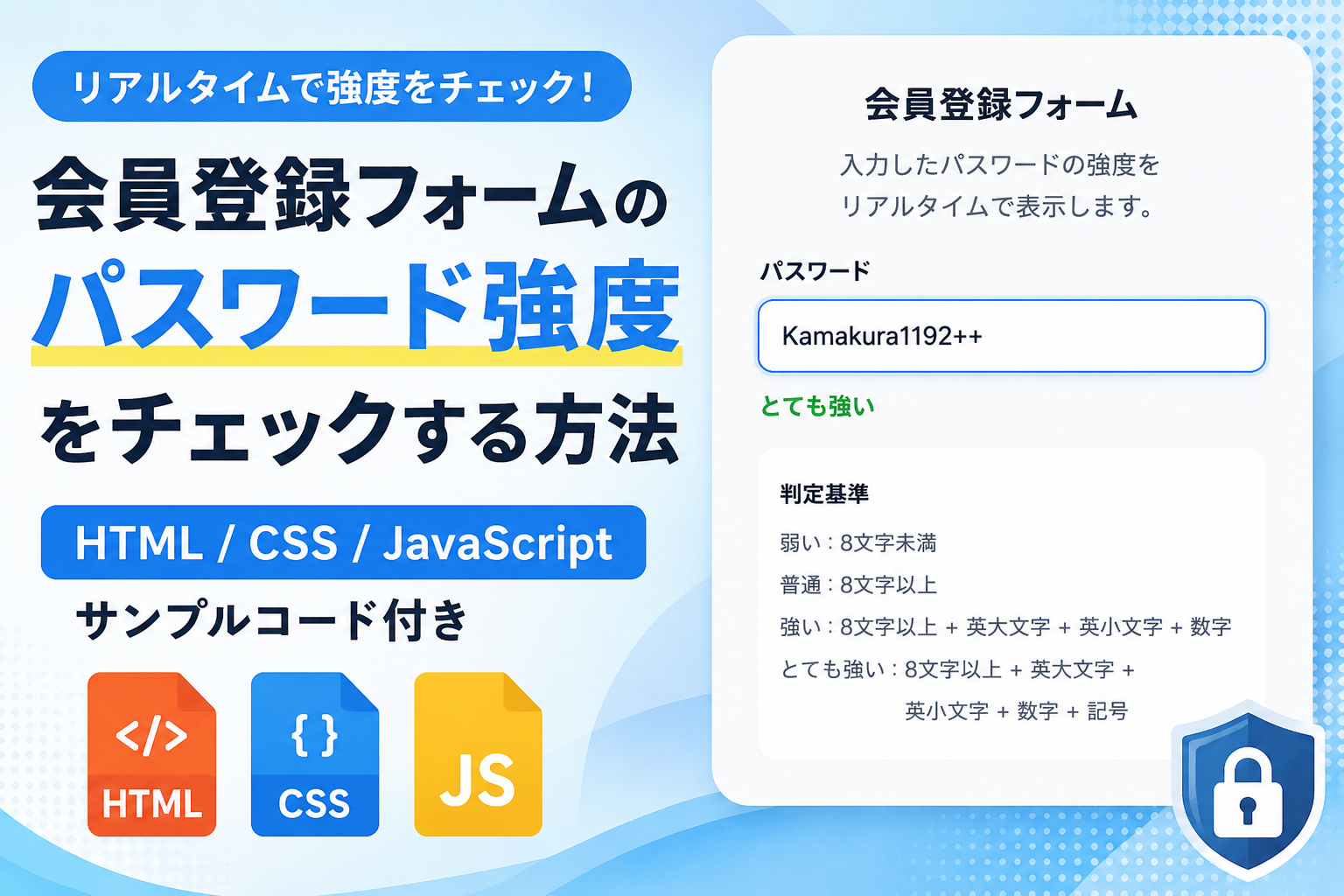
会員登録フォームのパスワード強度をチェックする方法
会員登録フォームで入力したパスワードの強度をリアルタイムでチェックする方法を紹介します。このサンプルでは、パスワード用のテキストフィールドへ文字を入力するとJavaScriptで内容を確認し、「弱い」「普通」「強い」「とても強い」の4段階で判定結果を表示します。文字数だけではなく、英大文字・英小文字・数字・記号が含まれているかを確認し、満たしている条件に応じて強度を切り替えます。
会員サイトの新規登録画面やアカウント作成画面など、利用者自身がパスワードを設定するフォームで利用できます。パスワードを入力・削除するたびに判定結果が更新されるため、確認ボタンを押さなくても現在の強度を確認できます。判定基準は、8文字未満を「弱い」、8文字以上を「普通」、8文字以上かつ英大文字・英小文字・数字を含む場合を「強い」、さらに記号を含む場合を「とても強い」としています。
HTMLではパスワード入力欄と強度の表示領域を作成し、CSSではフォームや判定結果を見やすく整えます。JavaScriptでは文字数と文字の種類をチェックして判定結果を切り替えます。判定に使用する文字数や条件、表示メッセージはコードから変更できるため、会員登録フォームの仕様に合わせて調整できます。また、フォームは画面幅に合わせて縮小し、640px以下では内側余白を小さくするため、スマートフォン・タブレット・PCで利用できます。
免責事項 本コードの利用により発生した損害について、当サイトは一切の責任を負いません。
デモ
パスワード強度の判定結果を表示したサンプルです。
普通:8文字以上
強い:8文字以上 + 英大文字 + 英小文字 + 数字
とても強い:8文字以上 + 英大文字 + 英小文字 + 数字 + 記号
※このデモでは判定結果の表示例を掲載しています。実際にパスワードを入力してリアルタイムで強度を判定する動作は、下記のHTML・CSS・JavaScriptのサンプルコードで確認できます。
コードをコピーして使おう!
<!DOCTYPE html>
<html lang="ja">
<head>

  <!-- 文字コード -->
  <meta charset="UTF-8">

  <!-- スマートフォン対応 -->
  <meta name="viewport" content="width=device-width, initial-scale=1.0">

  <!-- ページタイトル -->
  <title>会員登録フォームのパスワード強度チェック</title>

  <!-- CSSファイルを読み込む -->
  <link rel="stylesheet" href="style.css">

</head>
<body>

  <!-- 会員登録フォーム全体 -->
  <div class="member-registration-password-strength-check_wrap">

    <!-- タイトル -->
    <div class="member-registration-password-strength-check_title">
      会員登録フォーム
    </div>

    <!-- 説明文 -->
    <p class="member-registration-password-strength-check_text">
      パスワードを入力すると強度をリアルタイムで判定します。
    </p>

    <!-- パスワード入力項目 -->
    <div class="member-registration-password-strength-check_field">

      <!-- パスワード入力欄のラベル -->
      <label
        class="member-registration-password-strength-check_label"
        for="member-registration-password-strength-check-password">
        パスワード
      </label>

      <!-- パスワード入力欄 -->
      <input
        class="member-registration-password-strength-check_input"
        type="password"
        id="member-registration-password-strength-check-password"
        name="password"
        placeholder="パスワードを入力"
        autocomplete="new-password"
        aria-describedby="member-registration-password-strength-check-result">

      <!-- パスワード強度の判定結果 -->
      <div
        class="member-registration-password-strength-check_result"
        id="member-registration-password-strength-check-result"
        aria-live="polite">
        パスワードを入力してください。
      </div>

    </div>

    <!-- 判定基準 -->
    <div class="member-registration-password-strength-check_rule">

      <!-- 判定基準のタイトル -->
      <div class="member-registration-password-strength-check_rule-title">
        判定基準
      </div>

      弱い:8文字未満<br>
      普通:8文字以上<br>
      強い:8文字以上 + 英大文字 + 英小文字 + 数字<br>
      とても強い:8文字以上 + 英大文字 + 英小文字 + 数字 + 記号

    </div>

  </div>

  <!-- JavaScriptファイルを読み込む -->
  <script src="script.js"></script>

</body>
</html>サンプル一式を取得する場合 HTML・CSSなどすべてのファイルが必要な場合は、「サンプル一式をダウンロード」をクリックしてください。
Q ダウンロードしたけど、これをネット上で動かすにはどうするの?
Googleアカウントがあれば、InfinityFreeで無料サーバーを作成して、ダウンロードしたサンプルをネット上で動かせます。
InfinityFreeを初めて利用する場合は①から、すでにサーバーを作成している場合は②へ進んでください。
ファイル構成と設置方法
このサンプルはHTML・CSS・JavaScriptの3ファイルで構成されています。HTMLでパスワード入力欄、強度の判定結果、判定基準を配置し、CSSでフォーム全体や入力欄、判定結果のデザインを設定します。JavaScriptでは入力されたパスワードの文字数と、英大文字・英小文字・数字・記号が含まれているかを確認し、「弱い」「普通」「強い」「とても強い」の4段階でリアルタイムに判定します。外部サービスや外部ライブラリ、APIキーなどは使用しません。
sample/
├── index.html
├── style.css
└── script.js
各ファイルの役割
index.htmlは会員登録フォームの表示部分を構成するファイルです。「会員登録フォーム」のタイトル、説明文、パスワード入力欄、判定結果、判定基準を配置しています。パスワード入力欄にはtype="password"を指定しているため、入力した文字は伏せ字で表示されます。また、同じ階層にあるstyle.cssとscript.jsを読み込みます。
style.cssはフォーム全体とパスワード入力欄、判定結果、判定基準のデザインを設定するファイルです。フォームの横幅や余白、背景色、枠線、角丸などを設定し、判定結果は「弱い」を赤色、「普通」をオレンジ色、「強い」を青色、「とても強い」を緑色で表示します。
script.jsはパスワードの強度を判定するファイルです。パスワード入力欄のinputイベントを監視し、文字を入力または削除するたびに判定処理を実行します。入力内容そのものを保存したり送信したりする処理は行いません。
設置方法・使い方
sampleフォルダを作成し、その中へindex.html、style.css、script.jsを同じ階層で保存してください。保存後にsample/index.htmlをブラウザで開くと、index.htmlからstyle.cssとscript.jsが読み込まれます。パスワード入力欄へ文字を入力すると、その内容に応じた強度が入力欄の下へリアルタイムで表示されます。
判定は最初にパスワードが未入力かを確認します。入力欄が空の場合は「パスワードを入力してください。」と表示します。1文字以上入力されていてpassword.length<8に該当する場合、つまり8文字未満の場合は「弱い」と判定します。
8文字以上の場合は、文字数に加えて文字の種類を確認します。英大文字は/[A-Z]/、英小文字は/[a-z]/、数字は/[0-9]/で確認します。記号は/[^A-Za-z0-9]/を使用し、英大文字・英小文字・数字以外の文字が含まれているかを確認します。
8文字以上で英大文字・英小文字・数字・記号をすべて含んでいる場合は「とても強い」と判定します。8文字以上で英大文字・英小文字・数字を含み、記号の条件を満たしていない場合は「強い」と判定します。8文字以上でも「強い」「とても強い」の条件を満たしていない場合は「普通」と判定します。
カスタマイズできる内容
index.htmlでは、「会員登録フォーム」のタイトル、説明文、「パスワード」のラベル、入力欄のプレースホルダー、画面に表示する判定基準を変更できます。判定基準そのものを変更する場合は、表示だけを変更するのではなく、script.jsの判定条件も同じ内容へ変更してください。
style.cssでは、フォーム全体の最大横幅、余白、背景色、枠線、角丸、入力欄のデザイン、フォーカス時の枠線と影、各判定結果の文字色などを変更できます。
script.jsでは、強度を分ける文字数や必要な文字の種類、判定結果として表示する「弱い」「普通」「強い」「とても強い」の文字を変更できます。現在は英大文字・英小文字・数字・記号の有無を組み合わせて判定しています。
数値調整
style.css
padding:40px 20px;
ページ全体の内側余白です。40pxが上下、20pxが左右の余白です。値を大きくすると画面端との間隔が広がります。
max-width:520px;
フォーム全体の最大横幅です。値を大きくするとフォームが横に広がり、小さくするとコンパクトになります。
margin:40px auto;
フォーム全体の上下余白です。40pxを大きくすると上下の間隔が広がります。autoによってフォームを左右中央へ配置しています。
padding:32px;
フォーム全体の内側余白です。値を大きくすると内容と外枠の間隔が広がります。
border:1px solid #e5e7eb;
フォーム全体の枠線です。1pxを大きくすると枠線が太くなります。
border-radius:18px;
フォーム全体の角丸です。値を大きくすると丸みが強くなり、0にすると四角になります。
font-size:22px;
フォームタイトルの文字サイズです。値を大きくするとタイトルが大きく表示されます。
margin:0 0 24px;
説明文の下側余白です。24pxを大きくするとパスワード入力部分との間隔が広がります。
gap:8px;
ラベル、入力欄、判定結果の間隔です。値を大きくすると各要素の間隔が広がります。
padding:14px 16px;
パスワード入力欄の内側余白です。14pxが上下、16pxが左右の余白です。値を大きくすると入力欄の内側に余裕ができます。
border-radius:10px;
パスワード入力欄の角丸です。値を大きくすると丸みが強くなります。
font-size:16px;
パスワード入力欄の文字サイズです。値を大きくすると入力文字が大きく表示されます。
box-shadow:0 0 0 3px rgba(37,99,235,.15);
パスワード入力欄へフォーカスしたときの外側の強調表示です。3pxを大きくすると影の広がる範囲が大きくなります。
min-height:20px;
判定結果を表示する領域の最小高さです。値を大きくすると判定結果の表示領域が高くなります。
font-size:14px;
判定結果の文字サイズです。値を大きくすると「弱い」「普通」「強い」「とても強い」の表示が大きくなります。
margin-top:18px;
判定基準とパスワード入力部分の間隔です。値を大きくすると間隔が広がります。
padding:16px;
判定基準の内側余白です。値を大きくすると文章と外側との間隔が広がります。
border-radius:12px;
判定基準を表示する領域の角丸です。値を大きくすると丸みが強くなります。
font-size:13px;
判定基準の文字サイズです。値を大きくすると判定基準の文字が大きく表示されます。
script.js
password.length<8
文字数による強度判定の境界です。現在は8文字未満を「弱い」と判定しています。この8を変更すると文字数の基準を変更できます。変更した場合は、index.htmlに表示している「8文字未満」「8文字以上」の判定基準も同じ数値へ変更してください。
レスポンシブ対応
このサンプルはstyle.cssでレスポンシブ対応しています。フォーム全体にwidth:100%とmax-width:520pxを設定しているため、広い画面では最大520pxで表示し、画面幅が狭くなると利用できる横幅に合わせて縮小します。さらに@media (max-width:640px)を使用し、画面幅640px以下ではフォームの内側余白をpadding:24px 18px;へ変更します。これにより、スマートフォン・タブレット・PCの画面幅に合わせて利用できます。
.png)
コメント