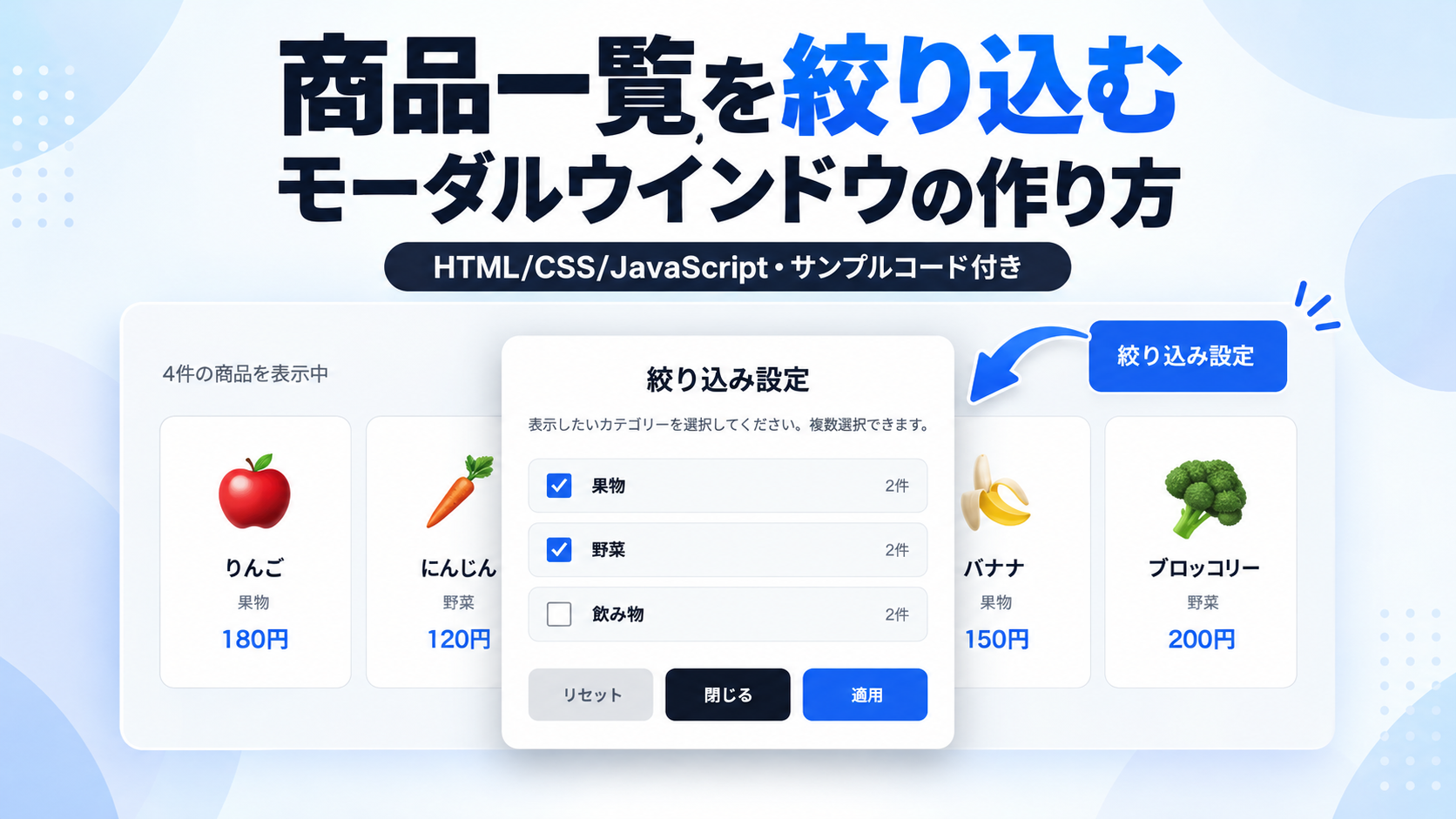
商品一覧を絞り込むモーダルウインドウの作り方
商品一覧を絞り込むモーダルウインドウを作る方法を紹介します。このサンプルでは、HTML・CSS・JavaScriptを使用し、「絞り込み設定」ボタンをクリックすると、画面中央にカテゴリー選択用のモーダルウインドウを表示する仕組みを作成します。商品一覧には果物・野菜・飲み物の3つのカテゴリーを用意しており、チェックボックスで表示したいカテゴリーを選択すると、条件に一致する商品だけを表示できます。
オンラインショップの商品一覧や商品カタログ、カテゴリー別のアイテム紹介ページなど、多くの商品から目的のものを探しやすくしたい場面に適しています。モーダルウインドウでは複数のカテゴリーを同時に選択でき、「適用」ボタンをクリックするとJavaScriptが各商品のカテゴリーを判定し、選択した条件に一致する商品だけを表示します。また、絞り込み後は表示中の商品件数が自動的に更新され、すべてのカテゴリーを選択解除した場合は、該当する商品がないことを知らせるメッセージが表示されます。
モーダルウインドウには「リセット」「閉じる」「適用」の3つのボタンを配置しています。「リセット」をクリックするとすべてのカテゴリーが選択状態に戻り、「閉じる」をクリックすると変更を適用せずにモーダルウインドウを閉じます。HTMLのdata属性で各商品にカテゴリーを設定し、JavaScriptでチェックボックスの選択状態と照合するため、商品やカテゴリーの追加・変更にも対応できます。また、CSSでは商品カードの並び方やモーダルの横幅、余白、背景色、ボタンのデザインなどを調整でき、スマートフォン・タブレット・PCでも利用しやすいレスポンシブ対応の構成です。
免責事項 本コードの利用により発生した損害について、当サイトは一切の責任を負いません。
デモ
商品一覧の絞り込み
「絞り込み設定」をクリックしてカテゴリーを選択すると、条件に一致する商品だけを表示できます。
りんご
果物
180円
にんじん
野菜
120円
コーヒー
飲み物
250円
バナナ
果物
150円
ブロッコリー
野菜
200円
牛乳
飲み物
220円
条件に一致する商品がありません。
「絞り込み設定」をクリックすると、カテゴリーを選択するモーダルウインドウが表示されます。「適用」をクリックすると、選択したカテゴリーの商品だけを表示します。「リセット」で全カテゴリーを選択し直せます。「閉じる」では変更を適用せずに戻ります。
コードをコピーして使おう!
<!DOCTYPE html>
<html lang="ja">

<head>

  <!-- 文字コード -->
  <meta charset="UTF-8">

  <!-- スマートフォン対応 -->
  <meta name="viewport" content="width=device-width, initial-scale=1.0">

  <!-- ページタイトル -->
  <title>商品一覧を絞り込むモーダルウインドウ</title>

  <!-- CSSファイル -->
  <link rel="stylesheet" href="style.css">

</head>

<body>

  <!--
    =========================================
    商品一覧と絞り込み機能
    =========================================

    【基本的な使い方】

    1. 商品カードをHTMLで登録します。
    2. 各商品にカテゴリーを設定します。
    3. モーダル内のチェックボックスでカテゴリーを選択します。
    4. 「適用」をクリックすると商品一覧が絞り込まれます。

    【主に変更する場所】

    ・商品名
    ・商品価格
    ・商品アイコン
    ・商品カテゴリー
    ・商品カードの枚数
    ・絞り込みカテゴリーの種類
    ・モーダル内の説明文

    商品とカテゴリーはHTMLで管理します。

    JavaScriptでは、カテゴリーの種類や商品件数を
    HTMLから自動取得するため、通常は変更不要です。

    商品カードのカテゴリーとチェックボックスの
    value属性を一致させることが重要です。
  -->

  <div class="filter-modal-window_wrap">

    <!--
      =========================================
      商品一覧のタイトル
      =========================================

      「商品一覧の絞り込み」を変更すると、
      商品一覧の上に表示されるタイトルが変わります。
    -->
    <h1 class="filter-modal-window_title">
      商品一覧の絞り込み
    </h1>

    <!--
      商品一覧の説明文

      この文章を変更すると、タイトル下に表示される
      説明文が変わります。
    -->
    <p class="filter-modal-window_text">
      「絞り込み設定」をクリックしてカテゴリーを選択すると、条件に一致する商品だけを表示できます。
    </p>

    <!-- =========================================
         表示件数と絞り込みボタン
    ========================================= -->

    <div class="filter-modal-window_toolbar">

      <!--
        商品の表示件数

        ここには現在表示している商品数を表示します。

        件数はJavaScriptが自動更新するため、
        商品カードを追加・削除しても
        この数字を手動変更する必要はありません。
      -->
      <p class="filter-modal-window_count" id="filter-modal-window-count">
        6件の商品を表示中
      </p>

      <!--
        絞り込み設定を開くボタン

        「絞り込み設定」の文字を変更すると、
        ボタンに表示される文字が変わります。

        id属性はJavaScriptで使用しているため、
        基本的に変更しないでください。
      -->
      <button class="filter-modal-window_open" id="filter-modal-window-open" type="button">
        絞り込み設定
      </button>

    </div>


    <!-- =========================================
         商品カード一覧
    ========================================= -->

    <!--
      【商品カードの変更方法】

      商品は、このエリア内に登録します。

      【商品を追加する場合】

      1. 既存のfilter-modal-window_card全体をコピーします。
      2. このエリア内に貼り付けます。
      3. 商品アイコン・商品名・価格を変更します。
      4. data-filter-categoryでカテゴリーを指定します。

      【商品を削除する場合】

      削除したい商品カードのdiv全体を削除します。

      【カテゴリーの設定】

      data-filter-categoryにカテゴリー名を指定します。

      fruit     :果物
      vegetable :野菜
      drink     :飲み物

      【重要】

      商品カードのdata-filter-categoryと、
      モーダル内のチェックボックスのvalue属性は
      同じ値にしてください。

      例:

      商品カード
      data-filter-category="fruit"

      チェックボックス
      value="fruit"

      この2つが一致している商品だけが、
      「果物」を選択したときに表示されます。

      カテゴリー名には日本語も使用できますが、
      管理しやすい英数字をおすすめします。

      カテゴリーを追加する場合は、
      モーダル側にも同じ値のチェックボックスを
      追加してください。

      商品件数はJavaScriptで自動計算します。
    -->

    <div class="filter-modal-window_grid" id="filter-modal-window-grid">

      <!--
        =========================================
        商品カード1:りんご
        =========================================

        【変更できる内容】

        🍎       :商品アイコン
        りんご   :商品名
        果物     :画面に表示するカテゴリー名
        180円    :商品価格

        【カテゴリー】

        data-filter-category="fruit"

        fruitは「果物」を表します。

        【商品を追加する場合】

        このdiv全体をコピーして、
        商品一覧内へ追加してください。

        アイコン・商品名・カテゴリー名・価格は
        コピーしたカードごとに変更できます。

        data-filter-categoryの値は、
        モーダル内のチェックボックスと一致させます。
      -->
      <div class="filter-modal-window_card" data-filter-category="fruit">

        <!-- 商品アイコン。絵文字や文字を変更できます -->
        <span class="filter-modal-window_icon" aria-hidden="true">🍎</span>

        <!-- 商品名 -->
        <p class="filter-modal-window_name">りんご</p>

        <!-- カテゴリーの表示名 -->
        <p class="filter-modal-window_category">果物</p>

        <!-- 商品価格 -->
        <p class="filter-modal-window_price">180円</p>

      </div>

      <!--
        =========================================
        商品カード2:にんじん
        =========================================

        vegetableは「野菜」を表します。

        商品内容を変更する場合は、
        アイコン・商品名・カテゴリー・価格を書き換えます。
      -->
      <div class="filter-modal-window_card" data-filter-category="vegetable">

        <!-- 商品アイコン -->
        <span class="filter-modal-window_icon" aria-hidden="true">🥕</span>

        <!-- 商品名 -->
        <p class="filter-modal-window_name">にんじん</p>

        <!-- カテゴリー -->
        <p class="filter-modal-window_category">野菜</p>

        <!-- 商品価格 -->
        <p class="filter-modal-window_price">120円</p>

      </div>

      <!--
        =========================================
        商品カード3:コーヒー
        =========================================

        drinkは「飲み物」を表します。
      -->
      <div class="filter-modal-window_card" data-filter-category="drink">

        <!-- 商品アイコン -->
        <span class="filter-modal-window_icon" aria-hidden="true">☕</span>

        <!-- 商品名 -->
        <p class="filter-modal-window_name">コーヒー</p>

        <!-- カテゴリー -->
        <p class="filter-modal-window_category">飲み物</p>

        <!-- 商品価格 -->
        <p class="filter-modal-window_price">250円</p>

      </div>

      <!--
        =========================================
        商品カード4:バナナ
        =========================================

        data-filter-category="fruit"なので、
        「果物」を選択したときに表示されます。
      -->
      <div class="filter-modal-window_card" data-filter-category="fruit">

        <!-- 商品アイコン -->
        <span class="filter-modal-window_icon" aria-hidden="true">🍌</span>

        <!-- 商品名 -->
        <p class="filter-modal-window_name">バナナ</p>

        <!-- カテゴリー -->
        <p class="filter-modal-window_category">果物</p>

        <!-- 商品価格 -->
        <p class="filter-modal-window_price">150円</p>

      </div>

      <!--
        =========================================
        商品カード5:ブロッコリー
        =========================================

        data-filter-category="vegetable"なので、
        「野菜」を選択したときに表示されます。
      -->
      <div class="filter-modal-window_card" data-filter-category="vegetable">

        <!-- 商品アイコン -->
        <span class="filter-modal-window_icon" aria-hidden="true">🥦</span>

        <!-- 商品名 -->
        <p class="filter-modal-window_name">ブロッコリー</p>

        <!-- カテゴリー -->
        <p class="filter-modal-window_category">野菜</p>

        <!-- 商品価格 -->
        <p class="filter-modal-window_price">200円</p>

      </div>

      <!--
        =========================================
        商品カード6:牛乳
        =========================================

        data-filter-category="drink"なので、
        「飲み物」を選択したときに表示されます。
      -->
      <div class="filter-modal-window_card" data-filter-category="drink">

        <!-- 商品アイコン -->
        <span class="filter-modal-window_icon" aria-hidden="true">🥛</span>

        <!-- 商品名 -->
        <p class="filter-modal-window_name">牛乳</p>

        <!-- カテゴリー -->
        <p class="filter-modal-window_category">飲み物</p>

        <!-- 商品価格 -->
        <p class="filter-modal-window_price">220円</p>

      </div>

    </div>


    <!-- =========================================
         該当商品がない場合
    ========================================= -->

    <!--
      選択したカテゴリーに一致する商品がない場合、
      JavaScriptによって表示されます。

      表示するメッセージは自由に変更できます。

      id属性はJavaScriptで使用するため、
      基本的に変更しないでください。
    -->
    <p class="filter-modal-window_empty" id="filter-modal-window-empty" role="status">
      条件に一致する商品がありません。
    </p>

  </div>


  <!-- =========================================
       絞り込み設定モーダルウインドウ
  ========================================= -->

  <!--
    このモーダルでは、表示したいカテゴリーを選択します。

    初期状態ではすべてのカテゴリーが選択されています。

    「適用」で選択状態を商品一覧へ反映します。

    「閉じる」で変更せずに戻ります。

    「リセット」ではすべてのカテゴリーを
    選択した状態に戻します。

    背景用のオーバーレイは使用しません。
  -->

  <div class="filter-modal-window_modal" id="filter-modal-window-modal" role="dialog" aria-modal="false" aria-labelledby="filter-modal-window-modal-title" aria-hidden="true">

    <!--
      モーダルタイトル

      「絞り込み設定」の文字を変更できます。
    -->
    <h2 class="filter-modal-window_modal-title" id="filter-modal-window-modal-title">
      絞り込み設定
    </h2>

    <!--
      モーダル説明文

      利用者に表示する操作説明です。
      カテゴリーの種類に合わせて変更できます。
    -->
    <p class="filter-modal-window_modal-text">
      表示したいカテゴリーを選択してください。複数選択できます。
    </p>


    <!-- =========================================
         絞り込みカテゴリー一覧
    ========================================= -->

    <!--
      【カテゴリーの追加方法】

      1. 既存のlabel全体をコピーします。
      2. このエリア内に貼り付けます。
      3. value属性に新しいカテゴリー名を指定します。
      4. 画面に表示するカテゴリー名を変更します。
      5. 対象の商品カードにも同じカテゴリーを指定します。

      【カテゴリーを削除する場合】

      該当するlabel全体を削除します。

      そのカテゴリーの商品が残っている場合、
      ほかのカテゴリーに変更するか、
      商品カードも削除してください。

      【カテゴリーを変更する場合】

      チェックボックスのvalue属性と、
      商品カードのdata-filter-categoryを
      同じ値に変更してください。

      【初期選択状態】

      checkedが付いたカテゴリーは、
      ページを開いたときから選択されます。

      チェックを外した状態で開始したい場合は、
      checkedを削除してください。

      JavaScriptがHTMLのcheckedを読み取り、
      初期表示の商品一覧へ反映します。

      【カテゴリーごとの商品件数】

      件数表示はJavaScriptで自動計算します。

      商品を追加・削除しても、
      「2件」などの数字を手動変更する必要はありません。

      【重要】

      新しいカテゴリーを追加しても、
      JavaScriptのカテゴリー一覧を
      書き換える必要はありません。
    -->

    <div class="filter-modal-window_options" id="filter-modal-window-options">

      <!--
        =========================================
        カテゴリー1:果物
        =========================================

        value="fruit"が絞り込み対象です。

        商品カードの
        data-filter-category="fruit"と一致します。

        「果物」の文字は表示名です。
        表示名だけを変更しても絞り込み対象は変わりません。

        checkedを削除すると、
        初期状態で選択されなくなります。

        商品件数はJavaScriptで自動表示されます。
      -->
      <label class="filter-modal-window_option">

        <input
          class="filter-modal-window_checkbox"
          type="checkbox"
          value="fruit"
          checked>

        果物

        <!-- このカテゴリーの商品件数。JavaScriptが自動更新します -->
        <span class="filter-modal-window_option-count">0件</span>

      </label>

      <!--
        =========================================
        カテゴリー2:野菜
        =========================================

        value="vegetable"が絞り込み対象です。

        商品カードの
        data-filter-category="vegetable"と一致します。
      -->
      <label class="filter-modal-window_option">

        <input
          class="filter-modal-window_checkbox"
          type="checkbox"
          value="vegetable"
          checked>

        野菜

        <!-- このカテゴリーの商品件数 -->
        <span class="filter-modal-window_option-count">0件</span>

      </label>

      <!--
        =========================================
        カテゴリー3:飲み物
        =========================================

        value="drink"が絞り込み対象です。

        商品カードの
        data-filter-category="drink"と一致します。
      -->
      <label class="filter-modal-window_option">

        <input
          class="filter-modal-window_checkbox"
          type="checkbox"
          value="drink"
          checked>

        飲み物

        <!-- このカテゴリーの商品件数 -->
        <span class="filter-modal-window_option-count">0件</span>

      </label>

    </div>


    <!-- =========================================
         操作ボタン
    ========================================= -->

    <div class="filter-modal-window_actions">

      <!--
        リセットボタン

        すべてのカテゴリーにチェックを入れ直します。

        この時点では商品一覧は変更されません。
        「適用」をクリックしたときに反映されます。
      -->
      <button class="filter-modal-window_reset" id="filter-modal-window-reset" type="button">
        リセット
      </button>

      <!--
        閉じるボタン

        モーダルを閉じます。

        選択途中の変更は適用されません。
      -->
      <button class="filter-modal-window_close" id="filter-modal-window-close" type="button">
        閉じる
      </button>

      <!--
        適用ボタン

        現在チェックされているカテゴリーを取得し、
        条件に一致する商品だけを表示します。

        適用後はモーダルが閉じます。
      -->
      <button class="filter-modal-window_apply" id="filter-modal-window-apply" type="button">
        適用
      </button>

    </div>

  </div>

  <!-- JavaScriptファイル -->
  <script src="script.js"></script>

</body>

</html>サンプル一式を取得する場合 HTML・CSSなどすべてのファイルが必要な場合は、「サンプル一式をダウンロード」をクリックしてください。
Q ダウンロードしたけど、これをネット上で動かすにはどうするの?
Googleアカウントがあれば、InfinityFreeで無料サーバーを作成して、ダウンロードしたサンプルをネット上で動かせます。
InfinityFreeを初めて利用する場合は①から、すでにサーバーを作成している場合は②へ進んでください。
ファイル構成と設置方法
このサンプルはHTML・CSS・JavaScriptの3ファイルで構成されています。HTMLでは商品一覧とカテゴリーを選択するモーダルウインドウを作成し、CSSでは商品カードやモーダルのデザインを設定します。JavaScriptではチェックボックスの選択状態に応じた商品の絞り込み、表示件数の更新、カテゴリーごとの商品件数の自動計算、モーダルの開閉などを制御します。商品カードには絵文字を使用しているため、画像ファイルを用意する必要はありません。
sample/
├── index.html
├── style.css
└── script.js
各ファイルの役割
index.htmlは、商品一覧と絞り込み設定モーダルウインドウを構成するファイルです。商品名・カテゴリー・価格・アイコンを表示する6枚の商品カードと、果物・野菜・飲み物の3種類のチェックボックスを用意しています。商品カードのdata-filter-category属性と、チェックボックスのvalue属性を組み合わせることで、カテゴリーごとの絞り込みを実現します。
style.cssは、商品一覧とモーダルウインドウのデザインを設定するファイルです。商品カードの列数や間隔、背景色、文字サイズ、モーダルの横幅、角丸、影、チェックボックスの色、操作ボタンの配置などを変更できます。画面幅に応じて商品カードの列数を変更するレスポンシブ設定も含まれています。
script.jsは、商品の絞り込み処理を制御するファイルです。HTMLに登録された商品カードとチェックボックスを取得し、選択されたカテゴリーに一致する商品だけを表示します。また、商品件数の自動計算、表示件数の更新、選択条件の保持、リセット、モーダルの開閉も担当します。カテゴリー名や商品数をJavaScriptに固定していないため、基本的なカスタマイズはHTMLだけで行えます。
設置方法・使い方
sampleフォルダを作成し、その中にindex.html・style.css・script.jsを配置してください。3ファイルを同じ階層に保存すると、index.htmlからCSSとJavaScriptが読み込まれます。
index.htmlをブラウザで開くと、商品一覧が表示されます。初期状態では、りんご・にんじん・コーヒー・バナナ・ブロッコリー・牛乳の6商品が表示され、商品一覧の上に現在の表示件数が表示されます。
「絞り込み設定」ボタンをクリックすると、画面中央にモーダルウインドウが表示されます。果物・野菜・飲み物のチェックボックスから表示したいカテゴリーを選択し、「適用」をクリックしてください。選択したカテゴリーに一致する商品だけが表示され、表示件数も自動的に更新されます。
例えば、果物だけを選択して「適用」をクリックすると、りんごとバナナの2商品が表示されます。果物と野菜を選択した場合は、りんご・にんじん・バナナ・ブロッコリーの4商品が表示されます。すべてのチェックを外して適用すると商品は表示されず、「条件に一致する商品がありません。」というメッセージが表示されます。
「リセット」をクリックすると、すべてのカテゴリーが選択状態に戻ります。ただし、リセットしただけでは商品一覧は変更されません。「適用」をクリックした時点で変更が反映されます。また、「閉じる」をクリックすると、選択途中の変更を適用せずにモーダルウインドウを閉じます。再び開いた場合は、最後に適用したカテゴリーの選択状態が復元されます。
このサンプルは、HTMLに配置された商品カードをJavaScriptで表示・非表示にする仕組みです。データベースへの接続や外部サービスとの通信は行わず、ページ内の商品一覧を絞り込みます。
カスタマイズできる内容
商品カードの変更
index.htmlのfilter-modal-window_grid内に、商品カードが登録されています。各カードには商品アイコン・商品名・カテゴリー・価格が設定されており、それぞれのHTMLを書き換えることで表示内容を変更できます。
例えば、りんごの商品カードでは、filter-modal-window_icon内の「🍎」を変更すると商品アイコンが変わります。filter-modal-window_name内の「りんご」を変更すると商品名が変わり、filter-modal-window_price内の「180円」を変更すると価格が変わります。カテゴリーの表示名はfilter-modal-window_category内の文字列で変更できます。
商品カードの追加・削除
商品を追加する場合は、既存のfilter-modal-window_cardを囲むdiv要素全体をコピーし、filter-modal-window_grid内に追加してください。追加したカードの商品アイコン・商品名・カテゴリー・価格を変更することで、新しい商品を登録できます。
商品を削除する場合は、対象のfilter-modal-window_card全体を削除してください。商品カードの追加・削除に合わせて、表示件数とカテゴリーごとの商品件数がJavaScriptによって自動計算されるため、件数を手動で変更する必要はありません。
商品カテゴリーの変更
商品の絞り込みに使用するカテゴリーは、商品カードのdata-filter-category属性で設定します。初期状態では、fruitが果物、vegetableが野菜、drinkが飲み物に対応しています。
例えば、data-filter-category="fruit"が設定された商品は、果物のチェックボックスを選択したときに表示されます。data-filter-category="vegetable"なら野菜、data-filter-category="drink"なら飲み物として扱われます。
商品カード内に表示する「果物」「野菜」「飲み物」という文字と、絞り込みに使用するdata-filter-categoryの値は別々に管理されています。表示名を変更するだけでは絞り込み条件は変わらないため、商品の所属カテゴリーを変更するときはdata-filter-categoryも確認してください。
絞り込みカテゴリーの追加
新しいカテゴリーを追加する場合は、index.htmlのfilter-modal-window_options内にあるfilter-modal-window_optionのlabel要素全体をコピーしてください。コピーした項目のチェックボックスに新しいvalueを設定し、表示するカテゴリー名を変更します。
例えば、「お菓子」というカテゴリーを追加する場合は、チェックボックスにvalue="snack"を設定します。続いて、お菓子の商品カードにdata-filter-category="snack"を設定してください。これにより、モーダル内で「お菓子」を選択したときに、そのカテゴリーの商品を表示できます。
重要なのは、チェックボックスのvalue属性と商品カードのdata-filter-category属性を一致させることです。値が異なる場合、そのチェックボックスを選択しても対象の商品は表示されません。
カテゴリーの表示名やvalueは自由に変更できますが、同じカテゴリーを表す商品カードとチェックボックスには、必ず同じ値を設定してください。なお、1枚の商品カードに設定するカテゴリーは、このサンプルでは1種類です。
絞り込みカテゴリーの削除
カテゴリーを削除する場合は、対象となるfilter-modal-window_optionのlabel要素全体を削除してください。そのカテゴリーに属する商品カードが残っている場合は、商品カードのカテゴリーを変更するか、カード自体を削除する必要があります。チェックボックスが存在しないカテゴリーの商品は、絞り込み条件として選択できません。
カテゴリーの初期選択
チェックボックスに設定されたchecked属性によって、ページを開いたときの選択状態を指定できます。checkedが付いているカテゴリーは初期状態で選択され、付いていないカテゴリーは選択されません。
例えば、果物と野菜だけにcheckedを設定し、飲み物のcheckedを削除すると、ページを開いた時点では果物と野菜の商品だけが表示されます。初期状態はJavaScriptがHTMLから自動取得するため、カテゴリーを追加した場合もJavaScriptの配列を書き換える必要はありません。
カテゴリーごとの商品件数
モーダル内のカテゴリー名の右側には、そのカテゴリーに登録されている商品数が表示されます。例えば、果物に2商品が登録されていれば「2件」と表示されます。
この件数はJavaScriptが商品カードのdata-filter-categoryを調べて自動計算するため、HTMLにあるfilter-modal-window_option-countの数字を手動で変更する必要はありません。商品を追加・削除した場合も、ページを再読み込みすると新しい件数が反映されます。
モーダルの表示内容
index.htmlでは、商品一覧のタイトルや説明文、「絞り込み設定」ボタンの文字、モーダルのタイトル、カテゴリーの表示名、「リセット」「閉じる」「適用」の各ボタンの文字などを変更できます。
ただし、JavaScriptで取得している各要素のid属性や、CSS・JavaScriptで使用しているクラス名は、対応するコードも変更しない限り、そのまま使用してください。
数値調整
style.css
max-width:700px;
商品一覧全体の最大横幅です。値を大きくすると商品一覧が横に広がり、小さくするとコンパクトになります。
margin:40px auto;
商品一覧全体の外側余白です。40pxは上下の余白で、値を大きくするとページ上部や周囲との間隔が広がります。autoによって左右中央に配置します。
padding:32px;
商品一覧の内側余白です。値を大きくすると外枠と商品カードの間隔が広がります。
border-radius:18px;
商品一覧やモーダルの角丸です。値を大きくすると丸みが強くなり、0にすると四角になります。
font-size:22px;
商品一覧やモーダルのタイトルの文字サイズです。値を大きくするとタイトルが大きくなります。
margin:0 0 24px;
説明文の下側余白です。24pxを大きくすると、説明文と次の要素との間隔が広がります。
gap:12px;
件数表示と絞り込みボタン、カテゴリーの選択項目、操作ボタンなどの間隔に使用しています。各セレクターの値を変更することで、それぞれの間隔を調整できます。
padding:12px 20px;
「絞り込み設定」ボタンの内側余白です。上下の12pxを大きくするとボタンが高くなり、左右の20pxを大きくすると横に広がります。
grid-template-columns:repeat(3,minmax(0,1fr));
商品カードの列数です。3を2に変更すると横2列、4に変更すると横4列になります。画面幅に合わせて適切な列数を指定してください。
gap:14px;
商品カード同士の間隔です。値を大きくするとカードの間隔が広がり、小さくすると狭くなります。
padding:20px 12px;
商品カードの内側余白です。上下20px・左右12pxを指定しています。上下の値を大きくするとカードが高くなり、左右の値を大きくすると内容と枠線の間隔が広がります。
font-size:38px;
商品アイコンの文字サイズです。値を大きくすると絵文字が大きくなります。
font-size:16px;
商品名の文字サイズです。値を大きくすると商品名が大きくなります。
font-size:13px;
商品カテゴリーやカテゴリーごとの件数表示などに使用しています。各セレクターの値を変更すると、それぞれの文字サイズを調整できます。
font-size:17px;
商品価格の文字サイズです。値を大きくすると価格を目立たせることができます。
top:50%;
モーダルの縦方向の表示位置です。画面中央を基準にしています。値を小さくすると上方向、大きくすると下方向へ移動します。
left:50%;
モーダルの横方向の表示位置です。画面中央を基準にしています。値を小さくすると左方向、大きくすると右方向へ移動します。
width:calc(100% - 40px);
モーダルの横幅です。画面幅から40pxを引き、左右に余白を確保しています。40pxを大きくすると画面端との間隔が広がります。
max-width:420px;
モーダルの最大横幅です。値を大きくするとモーダルが横に広がり、小さくするとコンパクトになります。
max-height:calc(100vh - 40px);
モーダルの最大高さです。画面の高さから40pxを引いた範囲に収め、内容が多い場合はモーダル内を縦スクロールできるようにしています。
padding:28px;
モーダル本体の内側余白です。値を大きくすると外枠と内容の間隔が広がります。
box-shadow:0 20px 40px rgba(0,0,0,.2);
モーダルの影です。20pxは影の上下位置、40pxはぼかし範囲を表します。.2を大きくすると影が濃くなります。
padding:14px 16px;
カテゴリー選択項目の内側余白です。上下14px・左右16pxを指定しており、値を大きくすると選択項目が広がります。
width:20px;・height:20px;
チェックボックスのサイズです。両方を同じ値で大きくするとチェックボックスが大きくなります。
margin-top:28px;
モーダル内の操作ボタンとカテゴリー選択項目との間隔です。値を大きくするとボタンが下方向に離れます。
padding:12px;
「リセット」「閉じる」「適用」ボタンの内側余白です。値を大きくするとボタンが大きくなります。
font-size:14px;
モーダル内の操作ボタンの文字サイズです。値を大きくすると文字が大きくなります。
レスポンシブ対応
このサンプルはレスポンシブ対応です。通常の画面幅では、grid-template-columns:repeat(3,minmax(0,1fr));によって商品カードを横3列に配置します。
画面幅640px以下では、商品カードを横2列に変更します。また、商品一覧の内側余白をpadding:24px 18px;に変更し、モーダルの内側余白や操作ボタンの間隔、文字サイズも調整します。
画面幅380px以下では、grid-template-columns:1fr;によって商品カードを縦1列に変更します。これにより、画面幅の狭いスマートフォンでも商品名や価格を確認しやすくなります。
モーダルウインドウにはwidth:calc(100% - 40px);とmax-width:420px;を設定しているため、画面幅が狭い場合は自動的に縮小します。また、カテゴリーが増えてモーダル内に収まらなくなった場合は、overflow-y:auto;によって内部を縦スクロールできます。
商品カードやカテゴリーを追加した場合も、HTMLの設定を変更するだけで絞り込み機能を利用できます。商品一覧の列数やモーダルのサイズは、掲載する商品数やカテゴリー数に合わせて調整してください。
.png)
コメント